Model Selection Guide
Choose the right AI model for your use case.
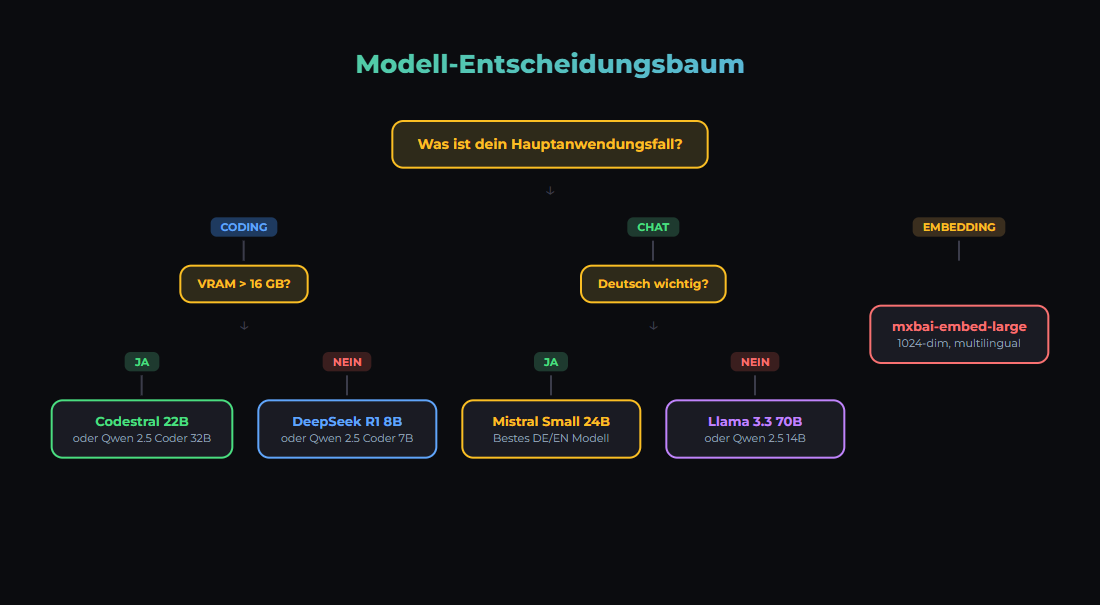
The Decision
Choosing the right model is the most important technical decision. Wrong model = bad results or unnecessary costs.
Model Categories
1. Small Models (1-3B Parameters)
- Examples: Llama 3.2 1B/3B, Gemma 2 2B, Phi-3.5 Mini
- Hardware: CPU is sufficient, 4-6GB RAM
- Latency: <100ms
- Use Cases: Embeddings, classification, simple Q&A
2. Medium Models (7-14B Parameters)
- Examples: Llama 3.1 8B, Qwen3 14B, Gemma 2 9B
- Hardware: 16GB RAM, GPU recommended (8-16GB VRAM)
- Speed: 43-112 tok/s on RTX 3090
- Use Cases: Chat, summarization, code generation, tool calling
3. Large Models (24B-34B Parameters)
- Examples: Mistral Small 3.1 (24B), Qwen 2.5 32B
- Hardware: 24GB VRAM (RTX 3090/4090)
- Speed: ~20-30 tok/s on RTX 3090
- Use Cases: Complex reasoning, long documents, highest local quality
- Note: 70B models do NOT fit on 24 GB VRAM — require 48 GB+ or multi-GPU
4. Top Open Source (S-Tier, March 2026)
- GLM-5 (Z AI): Reasoning specialist, GPQA Diamond 86%, HumanEval 90%, SWE-bench 77.8%
- Kimi K2.5 (Moonshot AI): HumanEval 99%, AIME 96.1%, SWE-bench 76.8% — S-Tier
- MiniMax M2.5: S-Tier in Artificial Analysis Leaderboard
- Qwen 3.5 Plus: MMLU 88.4%, ~1/13 the cost of Claude Sonnet
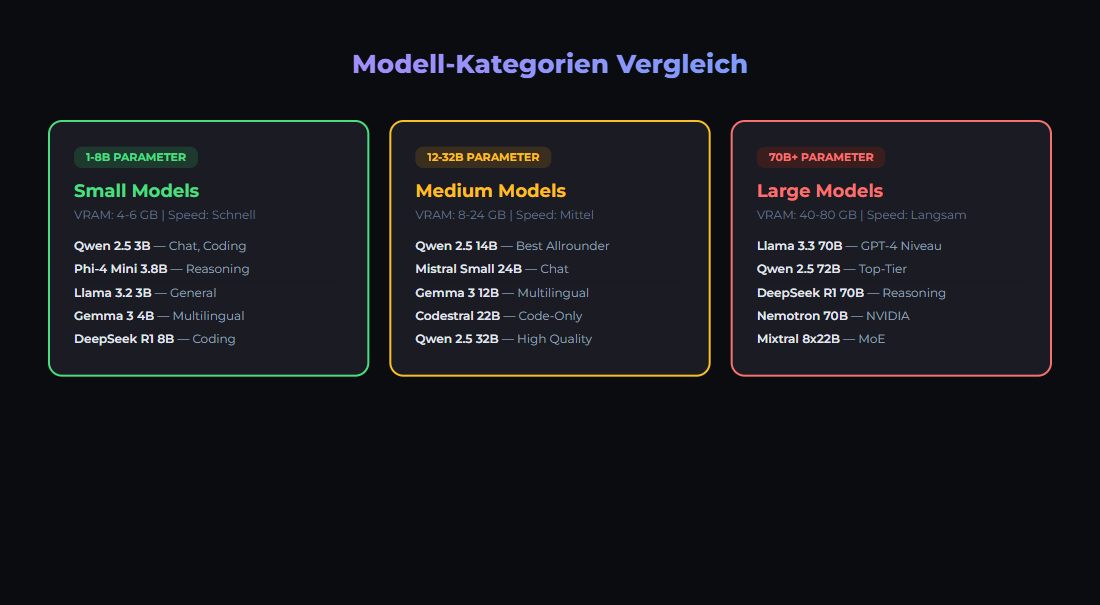
Comparison Table (as of March 2026)
| Model | Parameters | VRAM (Q4) | tok/s (RTX 3090) | Strength |
|---|---|---|---|---|
| Gemma 2 2B | 2B | ~2 GB | 200+ | Embeddings, classification |
| Llama 3.1 8B | 8B | ~5 GB | ~112 | All-rounder, fast |
| Qwen3 14B | 14B | ~10 GB | 43.2 | German, multilingual |
| Mistral Small 3.1 | 24B | ~16 GB | ~30 | German (outperforms GPT-4o Mini) |
| Qwen 2.5 32B | 32B | ~20 GB | ~20 | Coding, reasoning |
| Llama 3.3 70B | 70B | ~40 GB | Needs 48 GB+ | MMLU 86%, HumanEval 88.4% |
German Tip: Mistral Small 3.1 (24B) outperforms GPT-4o Mini and Gemma 3 for European languages — ideal for German-language chat and content tasks on local hardware.
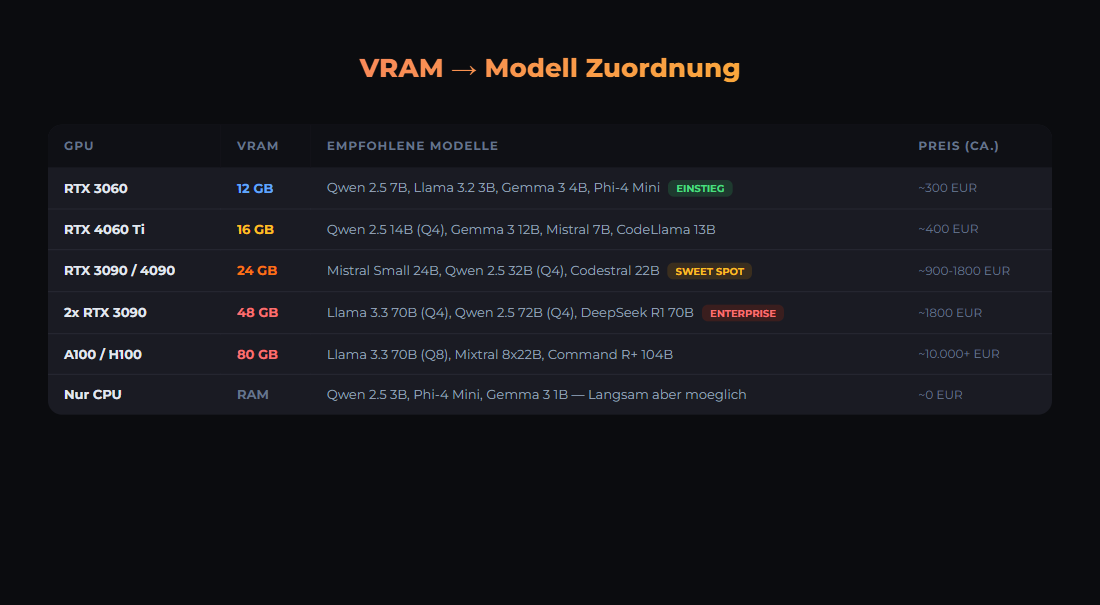
Hardware Requirements with Ollama
Here is what you need to run the models locally:
# Load and test Ollama models
ollama pull llama3.2

# List models
ollama list

# Chat with a model
ollama run llama3.2 "Hello, who are you?"

# Hardware check
ollama run llama3.2 "How much RAM did you use?"
Typical RAM usage with Ollama:
# VRAM usage (approx., Q4 quantized)
gemma2:2b           ~2GB VRAM   → 200+ tok/s
llama3.1:8b         ~5GB VRAM   → ~112 tok/s
qwen3:14b          ~10GB VRAM   → 43 tok/s
mistral-small3.1:24b ~16GB VRAM  → ~30 tok/s
qwen2.5:32b        ~20GB VRAM   → ~20 tok/s
llama3.3:70b       ~40GB VRAM   → DOES NOT FIT on 24GB GPU!

# RTX 3090 (24 GB): Maximum is about 34B (Q4_K_M)
# 70B needs 48 GB+ (2x RTX 3090 or RTX 6000 Ada)

# Save with quantized models
ollama pull llama3.1:8b       # 8B model, ~5GB
ollama pull qwen3:14b         # 4-bit default, ~10GB
Decision Guide
- Budget-friendly? Llama 3.1 8B or Qwen 2.5 7B (~112 tok/s on RTX 3090)
- Maximum local quality? Mistral Small 3.1 24B or Qwen 2.5 32B (fits on 24 GB)
- Fast embeddings? mxbai-embed-large (1024 dim)
- German language? Mistral Small 3.1 (outperforms GPT-4o Mini) or Qwen3 14B
- Absolute best quality? Cloud API: Claude Sonnet 4.5, GPT-4o, or Gemini 2.5 Pro
- Open Source S-Tier? GLM-5, Kimi K2.5, MiniMax M2.5 (need large GPU or cloud hosting)
Our Stack
# We use (as of March 2026):
# - mistral-small3.2:24b on RTX 3090 (.90) for chat/code (strong in German)
# - mxbai-embed-large on RTX 2060 (.99) for embeddings (1024 dim)
# - Cloud API (Claude Sonnet 4.5) for complex reasoning

# docker-compose.yml excerpt
services:
  ollama:
    image: ollama/ollama:latest
    volumes:
      - ollama_data:/root/.ollama
    deploy:
      resources:
        reservations:
          devices:
            - driver: nvidia
              count: 1
              capabilities: [gpu]

# Environment Variables
OLLAMA_HOST=0.0.0.0:11434
OLLAMA_MODELS=/root/.ollama/models
Sources
- Artificial Analysis LLM Leaderboard, March 2026 — Intelligence Index, 312 models, updates every 72h
- Onyx Open LLM Leaderboard — Kimi K2.5 HumanEval 99%, AIME 96.1%
- Vellum: Llama 3.3 70B vs GPT-4o — MMLU, HumanEval, IFEval benchmarks
- Mistral AI: Mistral Small 3.1 — Outperforms GPT-4o Mini for European languages
- LocalAIMaster: Best GPUs for AI — RTX 3090 tok/s measurements
- CoreLab: LLM GPU Benchmarks — 8B ~112 tok/s on RTX 3090
- IntuitionLabs: 24GB GPU Optimization — Max ~34B on 24 GB VRAM
- Ollama Model Library — Available models and quantizations
- LMSYS Chatbot Arena — Community-based model ranking
Related articles
Ollama Tutorial
Run local LLMs with Ollama: install, pick models, use the API and integrate into a GDPR-compliant, 100% self-hosted AI stack.
RAG Guide
Retrieval-Augmented Generation with ChromaDB, Qdrant, Neo4j.
Local vs Cloud: TCO Comparison
TCO comparison for AI workloads: cloud APIs vs a local AI stack (Ollama, n8n, monitoring). Costs, risks, privacy and operations in practice.
Was this article helpful?
Continue the learning path
The learning path puts these articles in order, and the Hub carries the building blocks we have checked in our own operations.
- Local and self-hosted
- Documented and verifiable
- From our own operations
- Made in Austria