Local AI vs Cloud: The TCO Comparison
Basics · 8 min
Cloud AI looks cheap — no hardware to buy, no maintenance, just start. But the hidden costs add up. Here's our honest comparison based on real usage.
Note: This is our comparison for the use case "continuous AI agent for business automation". For one-off analyses or prototypes, cloud can be cheaper.
The Scenarios
Cloud Usage
100 daily API calls to OpenAI/Gemini/Claude for workflow automation, support chatbot, and content generation.
Local Stack
Ollama on your own hardware (RTX 3090), n8n for automation, self-hosted monitoring. Everything runs 24/7.
Cost Comparison (per month)
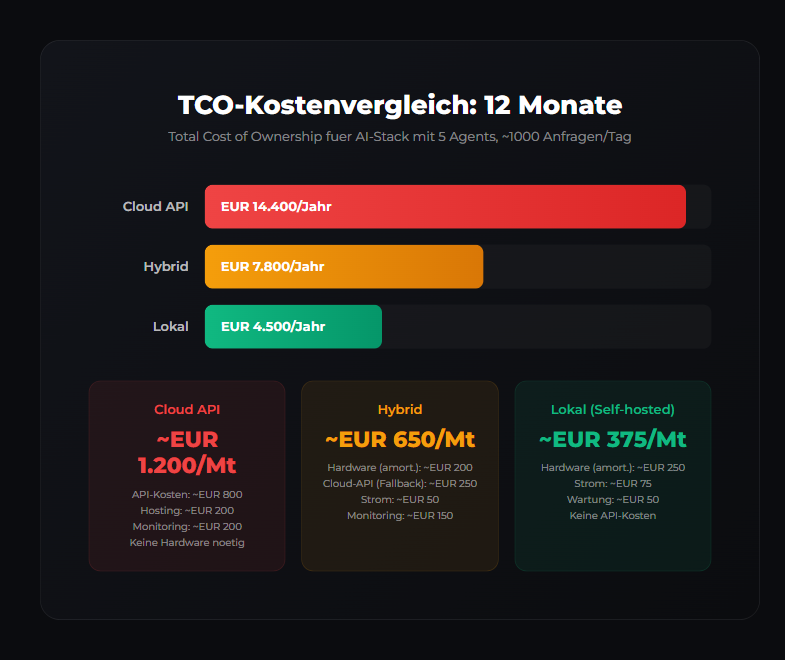
| Cost Item | Cloud | Local | Difference |
|---|---|---|---|
| API costs | €150-300 | €0 | -€150-300 |
| Hardware/Amortization | €0 | €25-50 | +€25-50 |
| Electricity (estimated) | €0 | €20-40 | +€20-40 |
| Hosting/Server | €0 | €10-20 | +€10-20 |
| Monitoring/Tools | €20-50 | €0* | -€20-50 |
| GDPR compliance | €50-200 | €0 | -€50-200 |
| Total/Month | €220-550 | €55-110 | -€165-440 |
*Grafana + Prometheus are open source, free
The Hidden Cloud Costs
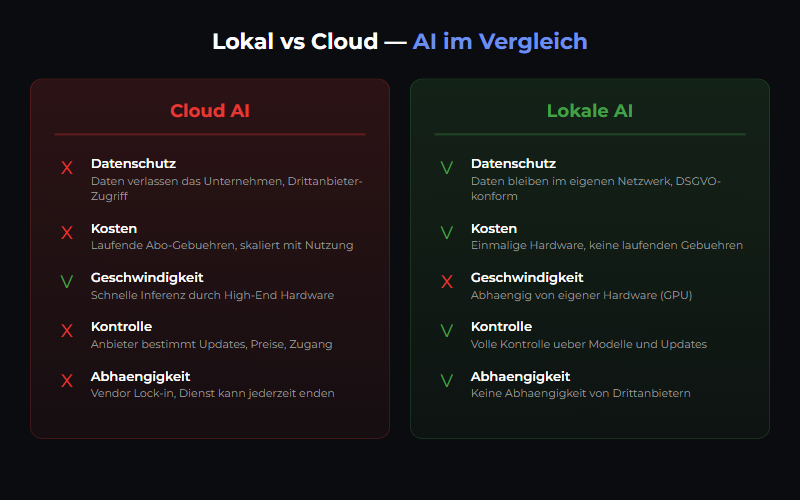
- API costs escalate — The more workflows you automate, the more calls. Often 2-3x higher than initially planned.
- GDPR risk — Data goes to the US. Art. 44 ff. GDPR requires additional measures (SCCs, TIAs). Legal counsel: €1,000+.
- Vendor lock-in — Your prompts, workflows, data are with the provider. Switching is expensive and time-consuming.
- Rate limits — Cloud providers throttle with heavy usage. Business plans cost extra again.
- Data incidents — Every data leak is your problem. Local systems = less risk.
When Cloud is Cheaper
| Use Case | Recommendation |
|---|---|
| Prototype (few calls/month) | Cloud — no setup needed |
| One-off analyses | Cloud — pay-as-you-go |
| No budget for hardware | Start cloud, switch later |
| Few internal tools | Cloud — overscale for little use |
| Continuous automation (our use case) | Local — cheaper after 6 months |
Break-Even Analysis
When does switching to local make sense?
Assumptions:
- RTX 3090 used: €600 (amortized over 24 months = €25/month)
- Electricity: €30/month
- Other costs (hosting, maintenance): €20/month
- Total local: ~€75/month

Break-even with cloud (estimated €200/month):
→ After 3 months: €600 (cloud) vs €225 (local) = €375 saved
→ After 12 months: €2,400 (cloud) vs €900 (local) = €1,500 saved
→ After 24 months: €4,800 (cloud) vs €1,800 (local) = €3,000 saved
Hardware Recommendations
| GPU | VRAM | Price (used) | Models |
|---|---|---|---|
| RTX 3060 | 12GB | €200-250 | Llama 3.2 7B, Mistral 7B |
| RTX 4070 | 12GB | €400-500 | Llama 3.1 8B, Qwen 14B |
| RTX 3090 | 24GB | €500-700 | Llama 3.1 70B (Quantized) |
| RTX 4090 | 24GB | €1,200-1,500 | Llama 3.1 70B, Qwen 72B |
Our Recommendation
Hybrid Approach (our setup)
- Local: Ollama for regular tasks, n8n workflows, monitoring
- Cloud: GPT-4o for complex reasoning tasks (few calls/month)
- Result: Best of both worlds — cost-efficient and powerful
Conclusion
At ~100 API calls per month, local becomes cheaper. Plus you get GDPR benefits (no third-country transfer) and independence from cloud providers. Our recommendation: Start with cloud (prototype), then switch to local (production).
Related articles
Ollama Tutorial
Run local LLMs with Ollama: install, pick models, use the API and integrate into a GDPR-compliant, 100% self-hosted AI stack.
Model Selection Guide
Choose the right AI model for your use case — from Llama to Mistral.
Docker vs Docker Swarm for AI
Which is right for AI? Compose for development, Swarm for production.
Was this article helpful?
Continue the learning path
The learning path puts these articles in order, and the Hub carries the building blocks we have checked in our own operations.
- Local and self-hosted
- Documented and verifiable
- From our own operations
- Made in Austria