API Keys: Secure Storage
Security · 5 min
API keys are the keys to your kingdom. If they leak, attackers have access to your AI, your data, your money. Heres how to store them securely.
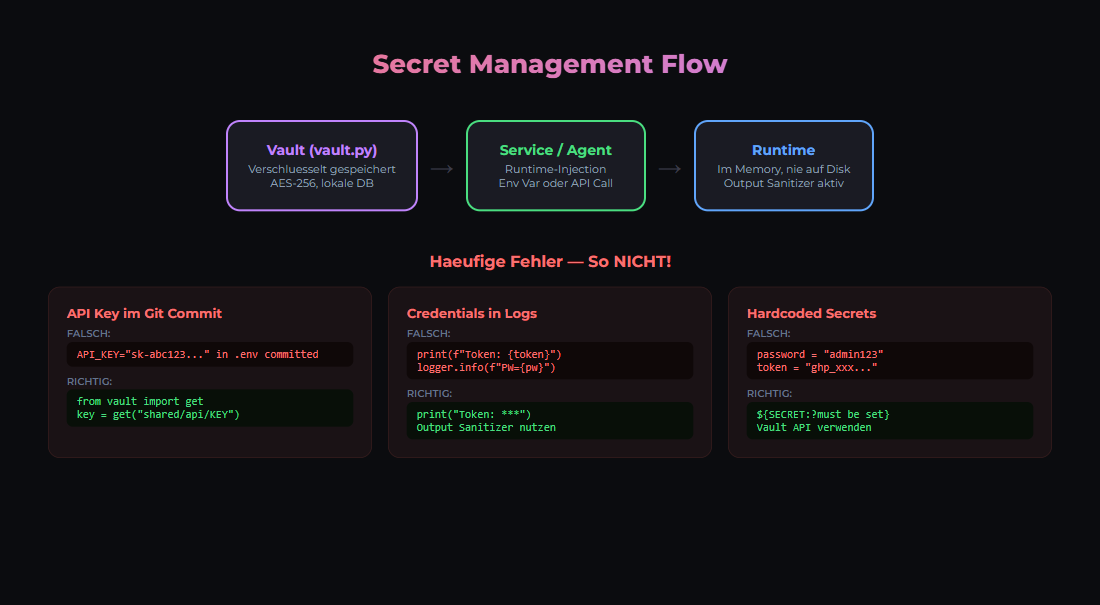
Never Do This
- ❌ Store in source code (git)
- ❌ Hardcode in config files
- ❌ Share in Slack/Discord
- ❌ Put in docker-compose.yml
Best Practice: Environment Variables
# .env file (NOT committed to git!)
OLLAMA_API_KEY=sk-xxx
STRIPE_SECRET_KEY=sk_xxx
DATABASE_URL=postgresql://...

# docker-compose.yml
services:
  app:
    image: myapp
    env_file:
      - .env
Better: Docker Secrets
# In Docker Swarm
echo "my_secret" | docker secret create api_key -

# docker-compose.yml
services:
  app:
    image: myapp
    secrets:
      - api_key

secrets:
  api_key:
    external: true
Best: HashiCorp Vault
For production: Use Vault for centralized secrets management.
# Get secret at runtime
curl -H "X-Vault-Token: $VAULT_TOKEN" \
  http://vault:8200/v1/secret/data/myapp/api-key
Checklist
- Add .env to .gitignore
- Rotate keys regularly
- Use different keys for dev/prod
- Monitor for leaked keys (GitHub scanning)
- Set up alerts for unusual API usage
Related articles
Was this article helpful?
Continue the learning path
The learning path puts these articles in order, and the Hub carries the building blocks we have checked in our own operations.
Why AI Engineering
- Local and self-hosted
- Documented and verifiable
- From our own operations
- Made in Austria
Not legal advice.