Security
Encryption: At Rest, In Transit, In Use
Data must be protected in three states: stored, transmitted, and during processing. Here is what that means in practice.
Encryption protects data in three phases: At Rest (on disk/SSD), In Transit (on the network), In Use (during processing in RAM). For a self-hosted AI stack, the first two are mandatory, the third is a bonus for high-security scenarios.
The Three Encryption Layers
If you encrypt data on disk but send it unencrypted over the network, you have a gap. Encryption must cover all three states.
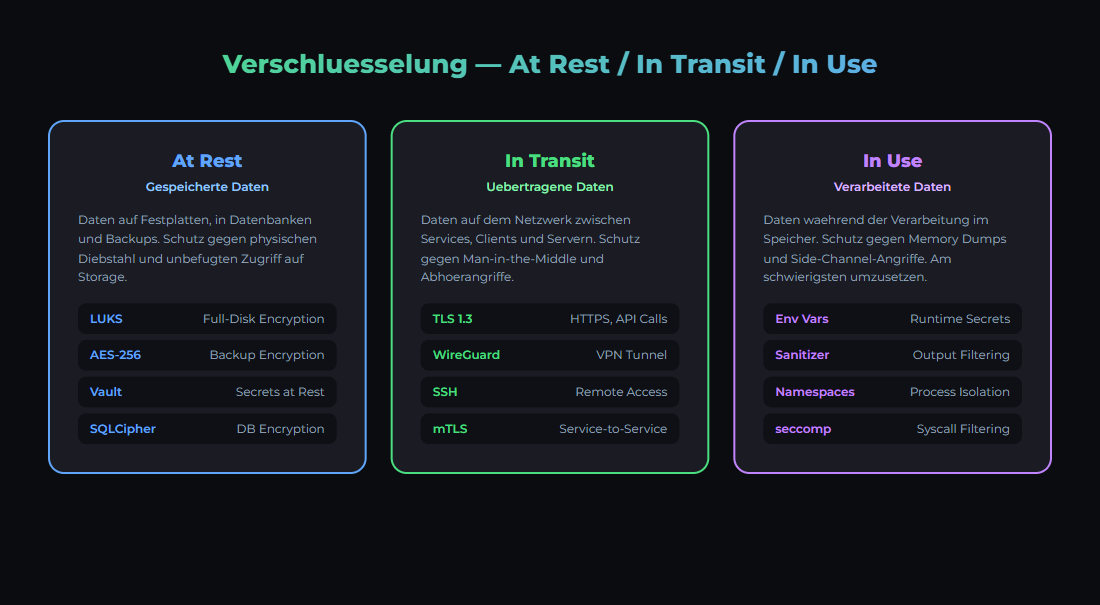
Data passes through three states — each needs its own protection.
| Phase | What | Threat | Protection |
|---|---|---|---|
| At Rest | Data on disk/SSD | Hardware theft, filesystem access | LUKS, dm-crypt, Veracrypt |
| In Transit | Data on the network | Man-in-the-Middle, eavesdropping | TLS 1.3, WireGuard VPN, SSH Tunnel |
| In Use | Data in RAM during processing | Memory dumps, cold boot attacks | Confidential Computing, Intel SGX, AMD SEV |
Encryption At Rest: Disk Encryption
At-rest encryption protects your data when someone physically accesses the disk — theft, disposal, repair. Without encryption, anyone can plug the drive into another machine and read everything.
LUKS (Linux Unified Key Setup)
LUKS is the standard for disk encryption on Linux. Most Linux distributions offer LUKS encryption during installation.
Encrypt an existing partition
# CAUTION: Create backup FIRST!

# Encrypt partition (all data will be erased!)
sudo cryptsetup luksFormat /dev/sdb1

# Open partition
sudo cryptsetup luksOpen /dev/sdb1 encrypted-data

# Create filesystem
sudo mkfs.ext4 /dev/mapper/encrypted-data

# Mount
sudo mount /dev/mapper/encrypted-data /mnt/secure-dataLUKS encryption on modern CPUs with AES-NI support has only about 1-3% performance overhead for sequential reads/writes. For random I/O (databases), overhead can be 5-10%. For AI workloads where the GPU is the bottleneck, you will not notice the difference.
| What to Encrypt | Priority | Reason |
|---|---|---|
| Backup Volumes | MANDATORY | Backups contain everything — databases, configs, secrets |
| Database Volumes | HIGH | Customer data, credentials, AI training data |
| System Partition | MEDIUM | Protects configs and logs if stolen |
| Swap Partition | HIGH | RAM contents written to disk (secrets!) |
| Model Storage | LOW | Models are public, but your fine-tunes are not |
Encryption In Transit: Network Encryption
Every connection between your services and to the internet must be encrypted. Even on your local network — networks get compromised, and ARP spoofing on a LAN is trivial.
| Connection Type | Encryption | Configuration |
|---|---|---|
| Web Traffic (external) | TLS 1.3 (HTTPS) | Let's Encrypt or Cloudflare (automatic) |
| Remote Access | WireGuard VPN | Peer-to-peer, <1ms overhead, UDP-based |
| Server-to-Server | SSH Tunnel | ssh -L 5432:localhost:5432 user@db-server |
| Internal API Calls | mTLS or SSH Tunnel | Service mesh or manual tunnels |
| Docker Swarm Overlay | IPSec (automatic) | docker network create --opt encrypted |
Ollama listens on http://localhost:11434 by default — unencrypted. When other machines on the network access it, all prompt traffic flows in plaintext. Solution: reverse proxy with TLS in front, or SSH tunnel.
WireGuard is faster, simpler, and more secure than OpenVPN. The configuration fits in 10 lines. On Linux: sudo apt install wireguard. Netbird (netbird.io) offers a managed WireGuard solution for zero-trust networks.
Encryption In Use: RAM Protection
While an LLM processes your data, it sits unencrypted in RAM. An attacker with root access can read memory and extract prompts, responses, and model weights.
| Technology | Availability | Protection | Overhead |
|---|---|---|---|
| Intel SGX | Xeon (server CPUs) | Enclaves in RAM | 5-30% |
| AMD SEV-SNP | EPYC (server CPUs) | Encrypted VM memory | ~2% |
| ARM CCA | ARMv9+ | Realms (isolated regions) | Low |
| Software Solutions | Everywhere | Memory scrubbing, ASLR | Minimal |
Confidential Computing (Intel SGX, AMD SEV) is primarily relevant for cloud scenarios where you do not trust the hoster. In your own homelab, you control the hardware. The practical measures: encrypt swap (prevents plaintext RAM paging), enable screen lock (prevents physical access), and do not leave unnecessary root sessions open.
Encryption Checklist for Self-Hosted AI
| Measure | Priority | Status Check |
|---|---|---|
| LUKS on backup volumes | MANDATORY | lsblk -o NAME,TYPE,FSTYPE | grep crypt |
| Swap encrypted | MANDATORY | swapon --show + /etc/crypttab |
| TLS for all web services | MANDATORY | curl -vI https://your-service.local |
| SSH Key-Only (no password) | MANDATORY | grep PasswordAuth /etc/ssh/sshd_config |
| WireGuard for remote access | HIGH | wg show |
| Docker overlay encrypted | HIGH | docker network inspect --format '{{.Options}}' |
| Ollama behind reverse proxy | HIGH | curl -I https://ollama.local |
| Database connections TLS | MEDIUM | psql 'sslmode=require' |
Encryption and GDPR
The GDPR requires "appropriate technical measures" to protect personal data (Art. 32). Encryption is explicitly mentioned as an example. Without encryption, you risk significantly higher penalties in case of a data breach.
GDPR Art. 34: If personal data was encrypted and the key was not compromised, the obligation to notify affected individuals in case of a data breach is waived. This is a strong incentive to deploy encryption everywhere.
More about data protection for AI applications in our GDPR Basics article and the GDPR Compliance Bundle.
Das Wichtigste
- ✓Three encryption phases: At Rest (disk), In Transit (network), In Use (RAM). The first two are mandatory.
- ✓LUKS for disks, TLS 1.3 for web traffic, WireGuard for remote access. All standard tools, no specialist knowledge needed.
- ✓Encrypt the swap partition! Otherwise RAM contents (prompts, API keys) end up in plaintext on disk.
- ✓GDPR Art. 32 explicitly mentions encryption. Encrypted data reduces notification obligations for breaches (Art. 34).
- ✓Ollama API runs unencrypted — put a reverse proxy with TLS or SSH tunnel in front.
Sources
- LUKS / cryptsetup — Linux Disk Encryption Standard
- WireGuard — Modern VPN Protocol
- GDPR Art. 32, 34 — Security of processing, notification of data breaches
- Confidential Computing Consortium — Encryption In Use Standards
Related articles
Self-Hosted Security: The 6-Layer Model
6 security layers for self-hosted AI infrastructure: network, SSH, firewall, containers, application, monitoring. Practical hands-on guide.
GDPR Basics
What does GDPR mean for AI applications? Data protection, consent, retention.
Backup Strategy
3-2-1 rule, automated backups for Ollama, n8n, PostgreSQL.
Related articles
Self-Hosted Security: The 6-Layer Model
6 security layers for self-hosted AI infrastructure: network, SSH, firewall, containers, application, monitoring. Practical hands-on guide.
GDPR Basics
What does GDPR mean for AI applications? Data protection, consent, retention.
Backup Strategy
3-2-1 rule, automated backups for Ollama, n8n, PostgreSQL.
Was this article helpful?
Continue the learning path
The learning path puts these articles in order, and the Hub carries the building blocks we have checked in our own operations.
- Local and self-hosted
- Documented and verifiable
- From our own operations
- Made in Austria