Security
Self-Hosted Security: The 6-Layer Model
When you host AI services yourself, you are responsible for security. No cloud provider catches mistakes for you. Here are the 6 layers that protect your infrastructure.
Self-hosting means full control — but also full responsibility. Security is not a single feature but a layered model: 6 layers from physical infrastructure to monitoring. Each layer stops something different. None is sufficient on its own.
The 6 Security Layers
Each layer addresses a different attack surface. If Layer 1 fails, Layer 2 must hold. This is Defense in Depth.
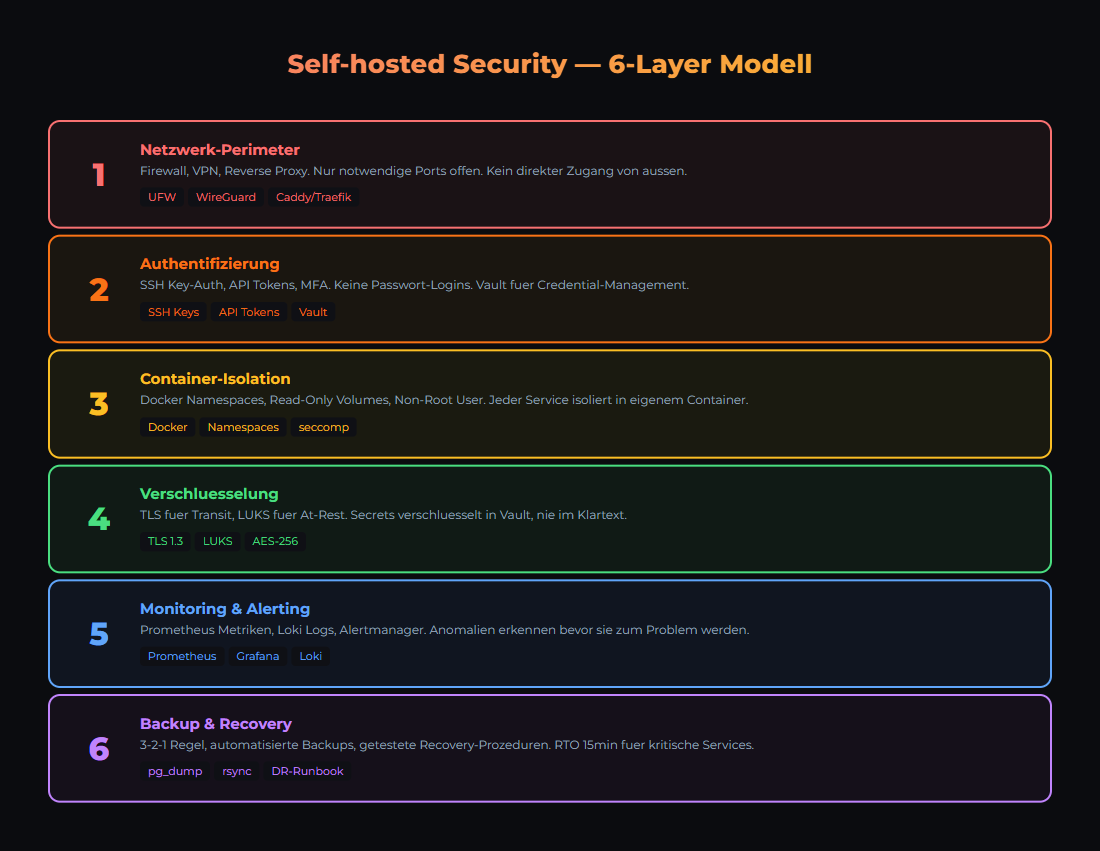
Security in layers: Each level protects against different attack vectors.
| Layer | Protects Against | Tools |
|---|---|---|
| 1. Network | Unauthorized external access | Firewall (UFW/iptables), VLAN, VPN |
| 2. SSH & Authentication | Brute force, weak passwords | SSH Key-Only, fail2ban, 2FA |
| 3. Host Operating System | Outdated software, kernel exploits | Unattended Upgrades, CIS Benchmark |
| 4. Containers & Services | Privilege escalation, unsecured APIs | Rootless containers, read-only FS, secrets |
| 5. Application | Prompt injection, data leakage | Input validation, output sanitizer, rate limits |
| 6. Monitoring & Response | Undetected intrusions | Loki, Grafana Alerts, audit logs |
Layer 1: Network Segmentation
Your local AI stack should NOT be directly reachable from the internet. The most important rule: Default Deny — everything is blocked, you only open what is needed.
UFW Basic Configuration
# Block everything (Default Deny)
sudo ufw default deny incoming
sudo ufw default allow outgoing

# Allow SSH (only from local network)
sudo ufw allow from 10.40.10.0/24 to any port 22

# Reverse Proxy (HTTPS)
sudo ufw allow 443/tcp

# Enable firewall
sudo ufw enable
sudo ufw status verboseServices like Ollama (11434), n8n (5678), Grafana (3000), PostgreSQL (5432) do NOT belong on the internet. If you need external access: VPN or reverse proxy with authentication (e.g., Cloudflare Tunnel or Traefik with BasicAuth).
Layer 2: SSH & Authentication
SSH is the main access point to your servers. Misconfigured, it becomes the biggest attack vector.
Hardening SSH (/etc/ssh/sshd_config)
# Disable password login
PasswordAuthentication no

# Prohibit root login (or key-only)
PermitRootLogin prohibit-password

# Allow specific users only
AllowUsers joe admin

# Idle timeout (5 minutes)
ClientAliveInterval 300
ClientAliveCountMax 0

# Restart: sudo systemctl restart sshd
Install fail2ban
# Installation
sudo apt install fail2ban

# Enable SSH jail
sudo cp /etc/fail2ban/jail.conf /etc/fail2ban/jail.local

# In jail.local:
# [sshd]
# enabled = true
# maxretry = 3
# bantime = 3600

sudo systemctl enable fail2ban
sudo systemctl start fail2ban

# Check status
sudo fail2ban-client status sshdIf you do not have SSH keys yet: ssh-keygen -t ed25519 -C "your@email.at". Copy the public key to the server: ssh-copy-id user@server. Then disable password login.
Layer 3 & 4: Host & Container Security
Host System
| Measure | Command / Configuration | Why |
|---|---|---|
| Auto-Updates | sudo apt install unattended-upgrades | Automatically apply security patches |
| Non-root User | sudo adduser deploy && sudo usermod -aG docker deploy | Minimal privileges, no permanent root |
| Kernel Updates | sudo apt upgrade linux-generic | Close kernel exploits |
| Unnecessary Services | sudo systemctl disable bluetooth cups | Reduce attack surface |
Container Security
| Principle | Implementation | Example |
|---|---|---|
| Read-Only Root | read_only: true in compose | Prevents filesystem manipulation |
| No Root in Container | user: '1000:1000' in compose | Container runs as normal user |
| Secrets Management | Docker Secrets or Vault | No credentials in environment variables |
| Resource Limits | mem_limit: 4g, cpus: '2.0' | Container cannot overwhelm the host |
| Network Isolation | Dedicated Docker networks per stack | Services only see what they need |
Many frameworks (FastAPI, Express) serve API documentation at /docs or /swagger automatically. In production: disable with docs_url=None. Attackers use these endpoints to map your API structure.
Layer 5: Application Security for AI
AI applications have unique security risks. LLMs can be manipulated (prompt injection) and leak sensitive data in their responses.
| Risk | Description | Countermeasure |
|---|---|---|
| Prompt Injection | User manipulates LLM instructions | System prompt isolation, input validation |
| Data Leakage | LLM outputs environment variables or secrets | Output Sanitizer (MANDATORY) |
| Token Theft | API keys intercepted | Vault, token rotation, rate limiting |
| Model Poisoning | Manipulated models from insecure sources | Only official sources (ollama.com, HuggingFace verified) |
| Resource Exhaustion | Excessively long prompts/contexts | Max token limits, request timeouts |
LLMs can be tricked into outputting environment variables, API keys, or system information. EVERY response must pass through a sanitizer that detects and removes patterns like API keys, IP addresses, and file paths. This is not a nice-to-have — it is mandatory for production.
Layer 6: Monitoring & Incident Response
Security without monitoring is blind. You need to know what happens on your systems — in real time.
| What to Monitor | Tool | Alert Condition |
|---|---|---|
| SSH Login Attempts | fail2ban + Grafana | More than 5 failed logins/hour |
| Container Health | Docker Health Checks + Uptime Kuma | Container unhealthy or stopped |
| Disk Usage | Prometheus Node Exporter | Disk > 85% full |
| API Errors | Loki Log Queries | HTTP 5xx rate > 1% of requests |
| Unexpected Processes | Audit Logs (auditd) | New process from unknown user |
Create a dedicated security dashboard with fail2ban bans, SSH logins, API error rates, and disk usage at a glance. You can see in 5 seconds if something is off. Our Grafana Monitoring Guide covers setting up security panels.
Das Wichtigste
- ✓Security is a layered model. 6 layers, each stops something different. None is sufficient alone.
- ✓Default Deny at the firewall. Only open what is needed. AI ports do NOT belong on the internet.
- ✓SSH Key-Only + fail2ban. No password login, automatic ban after 3 failed attempts.
- ✓Output Sanitizer is mandatory for AI applications. LLMs will leak secrets and system info otherwise.
- ✓Monitoring with alerting. Without monitoring, you will not know if someone is already inside.
Sources
- CIS Benchmarks — Industry standard for OS hardening
- Docker Security Documentation — Container security best practices
- OWASP Top 10 — Most common web application security risks
- fail2ban — Brute force protection for SSH and other services
Related articles
Encryption: At Rest, In Transit, In Use
Encryption for self-hosted AI: Protect data on disk, on the network, and during processing. LUKS, TLS, Confidential Computing explained.
Firewall Setup
UFW, fail2ban, network segmentation for local AI infrastructure.
API Keys Secure Storage
Vault, Environment Variables, Secrets Management for AI Stack.
Related articles
Encryption: At Rest, In Transit, In Use
Encryption for self-hosted AI: Protect data on disk, on the network, and during processing. LUKS, TLS, Confidential Computing explained.
Firewall Setup
UFW, fail2ban, network segmentation for local AI infrastructure.
API Keys Secure Storage
Vault, Environment Variables, Secrets Management for AI Stack.
Was this article helpful?
Continue the learning path
The learning path puts these articles in order, and the Hub carries the building blocks we have checked in our own operations.
- Local and self-hosted
- Documented and verifiable
- From our own operations
- Made in Austria