n8n: Workflow Automation
Tools · 8 min
n8n is a powerful workflow automation tool. It connects apps, services and APIs — without programming.
Why n8n?
Advantages
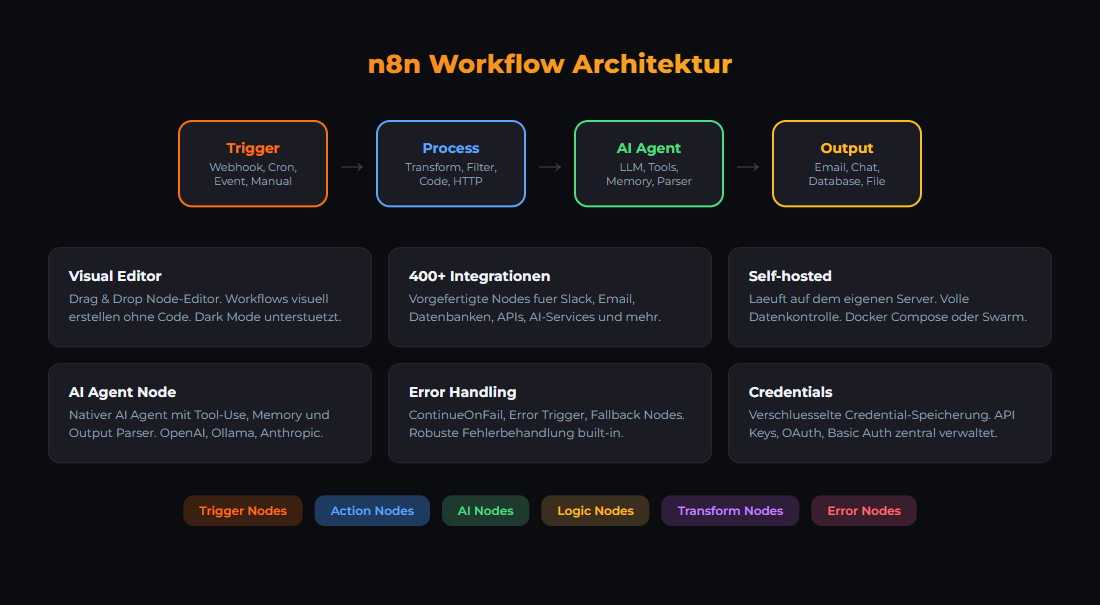
- Self-hosted - all data stays local
- Open Source - free
- 400+ integrations
- Code nodes for custom logic
Disadvantages
- More setup than cloud tools
- You are responsible for hosting
- Steeper learning curve
Installation
services:
  n8n:
    image: n8nio/n8n:latest
    ports:
      - "5678:5678"
    volumes:
      - n8n_data:/home/node/.n8n
Basic Concepts
Nodes are the building blocks. Each node does one thing.Workflows connect nodes into chains.Expressions like {{$json.name}} manipulate data.
Useful Nodes
- HTTP Request - API calls
- IF - Conditional branching
- Set - Transform data
- Function - Custom JavaScript code
- Slack / Team-Chat - Send messages
- Ollama - Local LLMs
Practical Examples
# Stripe Payment → E-Mail
Webhook (Stripe) → IF (success) → Email Send

# RSS → Newsletter
RSS Read (daily) → Slack → Email Send

# Form → AI → Save
Webhook → Ollama → Notion → Slack
Best Practices
- Start small - first simple, then expand
- Add error handling
- Use test mode
- Check logs for debugging
Related articles: n8n Workflow Bundle · Ollama Tutorial
For implementation support, find resources at ai-engineering.at.
Related articles
Tools
Mattermost AI Agent
Build an AI agent for Mattermost chat. Bot setup, prompts.
Tools
Grafana Monitoring
Monitoring with Prometheus + Grafana. Dashboards, alerts.
Grundlagen
30-Day Local AI-Stack Quickstart
Build a local, GDPR-compliant AI stack in 30 days. Day-by-day guide: Docker, Ollama, n8n, monitoring.
Was this article helpful?
Continue the learning path
The learning path puts these articles in order, and the Hub carries the building blocks we have checked in our own operations.
Why AI Engineering
- Local and self-hosted
- Documented and verifiable
- From our own operations
- Made in Austria
Not legal advice.