Backup Strategy
Security · 5 min
Backups are your insurance policy. Heres how to backup your AI stack properly.
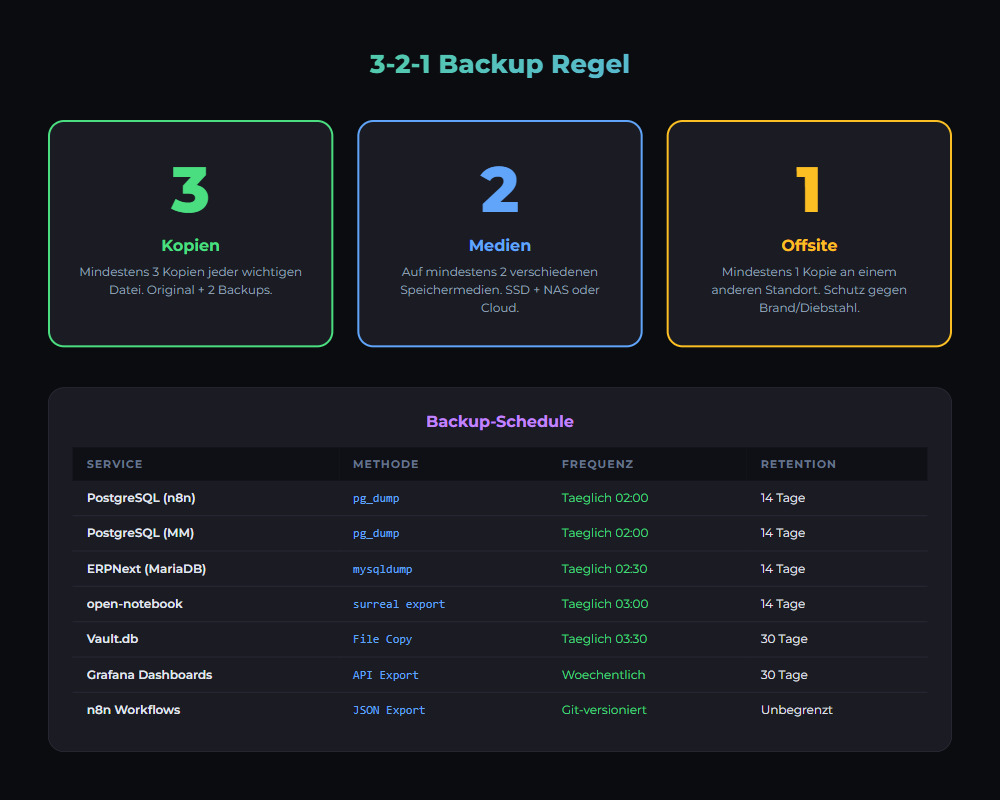
3-2-1 Rule
- 3 copies of data
- 2 different storage types
- 1 copy offsite
What to Backup
| Service | Data | Priority |
|---|---|---|
| PostgreSQL | Database dumps | Critical |
| Ollama | Models (~4GB each) | High |
| n8n | Workflows JSON | High |
| Docker configs | docker-compose.yml | Medium |
Backup Script
#!/bin/bash
DATE=$(date +%Y%m%d_%H%M)

# PostgreSQL
docker exec postgres pg_dump -U user db > backup_$DATE.sql

# n8n
tar czf n8n_$DATE.tar.gz ./n8n-data

# Ollama models
tar czf ollama_$DATE.tar.gz /var/lib/ollama

# Upload to remote
rclone copy . remote:backups/$DATE/

# Keep only 7 days locally
find . -name "*.sql" -mtime +7 -delete
Cron Schedule
# /etc/cron.d/backup
# Daily at 2am
0 2 * * * root /opt/scripts/backup.sh
Recovery Test
- Test restore quarterly
- Document recovery steps
- Verify backups are complete
- Test with team
Related articles
Security
Firewall Setup
UFW, fail2ban, network segmentation for local AI infrastructure.
Tools
Proxmox Setup
Virtualization with Proxmox VE. VMs, containers, cluster.
Grundlagen
Local vs Cloud: TCO Comparison
TCO comparison for AI workloads: cloud APIs vs a local AI stack (Ollama, n8n, monitoring). Costs, risks, privacy and operations in practice.
Was this article helpful?
Continue the learning path
The learning path puts these articles in order, and the Hub carries the building blocks we have checked in our own operations.
Why AI Engineering
- Local and self-hosted
- Documented and verifiable
- From our own operations
- Made in Austria
Not legal advice.